

This is Detailed Articles with deep Explanation on Subdomain Enumeration Technique with Actively and Passively.
What is Subdomain Enumeration
Subdomain enumeration is a process of finding subdomains for one or more domains.
Why subdomain enumeration is important
- Sub-domain enumeration helps in the scope of security assessment by revealing the domain/sub-domain of the target organization.
- Sub-domain enumeration increase the chances of finding vulnerability
- Subdomain enumeration helps us to find web applications that may have been forgotten/neglected by the organization due to maintenance or other reasons and may reveal critical vulnerabilities.
🔶 Different ways of subdomain enumeration
There are two types of enumeration techniques available which consist of other sub techniques.
💪 Active subdomain enumeration
In Active subdomain enumeration, the adversary or tester collects information by directly probing infrastructure managed by the organization.
In active subdomain enumeration, it may be possible for the organization to detect the adversary or examiner. Such checks may result in alerts and/or flags.
➡ Active subdomain enumeration technique : 👇
- Brute force enumeration
- DNS records
- HTTP headers
- dictionary enumeration
- Zone walking
- DNS cache snooping
âž¡ Passive subdomain enumeration
Receive information without direct contact with the target. This means: using search engines or to find publicly available information, things like mention below : 👇
Passive subdomain enumeration technique
- Certificate Transparency
- Subject alternate name (SAN)
- ASN Discovery
- Using DNS aggregators (Github, Virustotal, etc)
- Using Search Engines
- DNS Enum using Cloudflare
- Using public datasets
Active sub-domain enumeration in Detail
Brute force or dictionary attack
The brute force attack is that, in brute force a large number of possible key permutations are checked, whereas in dictionary attack is also a brute force attack but, only words with highest probability of success are checked and takes less time as compared to brute force.
The brute-forcing is to try the possible combination of words, alphabets, and numbers before the main domain in order to get a subdomain that is resolved to IP address.
Sometimes subdomains are not indexed on search engines and are not available on online DNS aggregator sites, in such case the best way to locate subdomain is to find forgotten subdomain by organization.
Two main technique for subdomain enumeration using brute force
- Directory Brute Forcing
- Permutation Brute Forcing
Directory Brute Forcing 🌩
In the brute force dictionary, we directly brute force a word list of domain names to find valid subdomains.
Tools That we use in Directory Brute Forcing 👇
Permutation Brute Forcing 🌩
In permutation brute force, we generate a new resolved subdomain list from already known subdomain/domains using permutation, mutation and transformation with wordlist.
🛠Tools use in permutation brute forcing
Subdomain Enumeration by Zone Transfer
DNS zone transfer is the process of copying DNS databases or DNS records from primary name servers to secondary name servers.
DNS zone transfer functionality is used by an adversary only if the primary name server is configured to replicate zone information to any server. An adversary acts as a slave and requests a main copy of the zone record from primary name server.
Why DNS zone transfer needs :
- Availability, if any how the primary name server down then secondary name server handles all the DNS request
- Load Balancing, If DNS name resolution occurs and load on primary dns server then the balance of these load request will be distributed between primary and secondary Domain name server (DNS).
- Faster Resolution, if the primary name server is slow wlan link then secondary name server handles the request
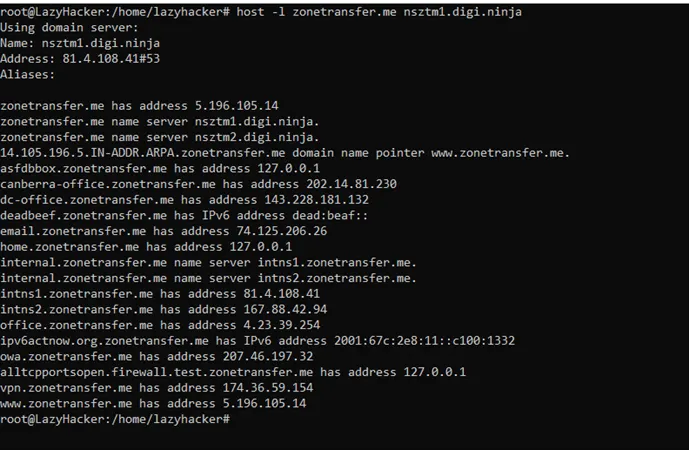
Type of Information gathering by zone transfer
- Subdomain
- Email address (Could help in phishing)
- Current serial number (Change in serial no. may indicate changes in the organization)
- Email server (Could help in phishing)
- Name server
- Location may be disclosed by LOC record
- The IP address of the website
- Services running in the organization by SRV record
Commands to check zone transfer
# dig ns zonetransfer.me +noall +answer
# dig axfr @nsztm1.digi.ninja zonetransfer.me
# host -t ns zonetransfer.me
# host -t ns zonetransfer.me
# host -t axfr zonetransfer.me intns1.zonetransfer.me
# nslookup -type=ns zonetransfer.me
# nslookup -query=AXFR zonetransfer.me nsztm2.digi.ninja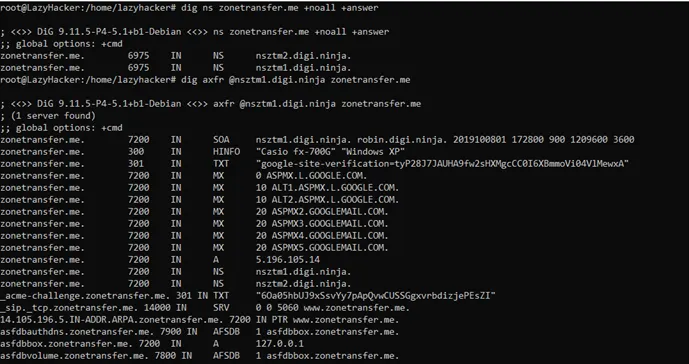
Subdomain Enumeration with Domain Name System Security Extensions (DNSSEC)
Domain Name System Security Extensions (DNSSEC) are used to protect the integrity and authenticity of data in DNS by establishing a chain of trust.
Before understanding DNSSEC, we must first understand the basics of DNS:
What are DNS functionalities?
- DNS is used to translate the domain names to IP address or vice-versa like www.example.com → 192.168.1.10 or 192.168.1.10 � www.example.com
- DNS works over both TCP and UDP but generally UDP works on port 53.
- TCP port 53 is used when very large requests and responses are sent, for example zone transfers.
Why Domain Name System (DNS) Establishes ?
Domain names are alphabet and they are easier to remember that is why we use domain names.
Before DNS the host.txt file was required to be regularly updated, which was distributed to all hosts on the Internet.
Issues with this DNS :
- The host file usually was huge after prolonged usage
- Regular manual updating was required
- Name uniqueness maintenance was required, which proved a difficult task.
How DNS Works ?
When you enter a domain name in the browser ( www.google.com ), it first tries to resolve from the system host file., Then passes the request to the ISP DNS server, then passes to another DNS server and this process continues until the request is not resolved.
When the request is resolved the response flow to the DNS servers is returned to the original requestor i.e. your browser and then the requested website becomes accessible.
Basic DNS Terminologies
- Name servers : Authoritative and Non-Authoritative/ Catching Server.
- DNS Query : Recursive DNS query, Non-recursive or recursive DNS query, Inverse query
Type of Name Servers
Authoritative Server :
- An authoritative name server is an authoritative name server that is authorized to provide answers for the domain your browser querying.
- The authoritative name server can be more than one name server.
- There are two types of authoritative name servers based on the management method primary (master) and secondary (slave).
- Changes are made to the primary name server and the secondary name servers will receive a copy of the zone file from the primary name server.
🛠Tools we have used is : nslookup
nslookup google.com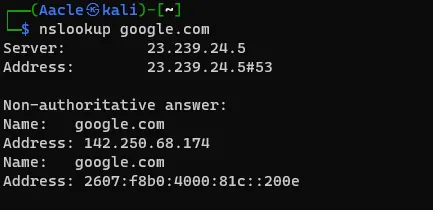
Non-Authoritative/Caching Server :
- Non-authoritative name servers are cache servers, which cache domain information for a faster response for the domain you’re querying.
🛠Tool we used to look name server : nslookup
1. nslookup -type=ns google.com
2. nslookup google.com ns1.google.com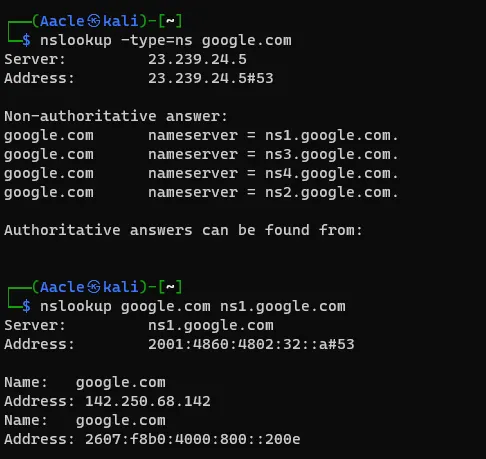
DNS Query
DNS query is configured on the DNS server and accordingly, the DNS server works.
Recursive DNS Query :
When recursive query is configured on a DNS server, the DNS server does all the work on your behalf to get the answer to your query. During this process, the DNS server may query other DNS servers on the Internet for answers.
Non-Recursive or Iterative DNS Query
When a non-recursive query is configured on the DNS server then the DNS server do not fetch the complete answer of the query on behalf of you but will give the address of other DNS server, which might have the answer of the query. During this process, the DNS server might provide the IP address of other DNS servers on the internet for the answer and the operating system resolver will query until the domain name does not resolve.
Inverse Query
Inverse DNS query works opposite to normal DNS query. Inverse DNS query or reverse DNS query is used when the user wants to resolve the IP address to a fully qualified domain name (FQDN).
DNS Protocol Vulnerability
The original DNS protocol was not designed with security in mind, as the Internet grows, it becomes less trustworthy. There was no DNS data protection mechanism available which caused below vulnerabilities:
- DNS data can be corrupted as it was transferred between primary server, secondary server, resolver or forwarder, cache server.
- DNS data transaction could be compromised as the primary server may send DNS records data to the wrong secondary server which could be in adversary control.
- There was no way to check the integrity of the DNS data.
Basic DNS Security Practices
- Run the updated version of DNS software.
- Restrict queries
- Prevent unauthorized zone transfers
- Run BIND with the least privilege (use chroot)
- Randomize source ports
- Secure the box
- Implement TSIG and DNSSEC
Two protection mechanism “Transaction Signature (TSIG) and DNS Security Extension (DNSSEC)� use for DNS data protection
Transaction Signature (TSIG)
- TSIG secures the transaction to protect zone transfer and dynamic updates.
- TSIG makes sure that the DNS query (Ex: AXFR) comes from the right place and is not modified in transit.
- Work on a shared secret key, which is configured on both master and slave DNS servers.
- TSIG is configured in the DNS server (named.conf) file, not in the zone file.
- A wrong key does not allow for the zone transfer and will be logged on the server log.
Command: dig @<server> <zone> AXFR -k <TSIG key file>dig @localhost example.com AXFR -k Key-ns1.net.+200+1337.keyDNS Security Extension (DNSSEC)
- DNSSEC is used to secure the zone data by making sure that the resource records are those records that are signed by the administrator of the zone.
- It protects the integrity and authenticity of the zone data by establishing the chain of trust.
- It uses a digital signature to verify the zone data.
For signature validation DNSSEC add new DNS record types:
RRset and RRSIG
The first step for securing the zone with DNSSEC is to group all the same types of records which is called resource record set (RRset).
RRset Example:
Bundle into a single A RRset
www.example.com. 7200 IN A 192.168.1.10

blog.example.net. 7200IN A 10.0.1.1

admin.example.net. 7200IN A 172.16.2.20
RRsets are digitally signed with the private key of the zone server and signature are published in DNS as RRSIG. Public DNSKEY is also published to verify the RRSIG signature.
RRSIG Example:
Zone Signing Key (ZSK)
- The private zone signing key is used to digitally sign each RRset and store them in RRSIG.
- The public zone signing key is used by the resolver to verify the digital signature stored in RRSIG.
- The public zone signing key stored in the DNSKEY record.
- When DNSSEC resolver asks for a DNS record (e.g. A), the name server also return the corresponding RRSIG, and then DNSSEC resolver ask for the public ZSK from the name server.
- If we trust the zone signing key, then we can trust all the records in the zone but what if the zone signing key was compromised? So, to validate the public ZSK we used key signing key (KSK).
Key Signing Key (KSK)
- The KSK validates the DNSKEY record for zone signing key in the same way the ZSK validates the RRSIG record.
- The private KSK signed the public ZSK and public KSK, which is stored in DNSKEY record and create an RRSIG for the DNSKEY that stores the signature of the public ZSK and KSK.
- The name server stores the public KSK in another DNSKEY record.
- DNSSEC resolver used the public KSK to validate the public ZSK.
- To establish trust within the zone.
- The key signing key (KSK) is signed by itself, which does not provide any additional trust, an attacker compromised the zone and may alter all these keys. So, for the complete trust, we need parent-child trust for this delegation signer (DS) record is used.
Delegation Signer (DS) Record
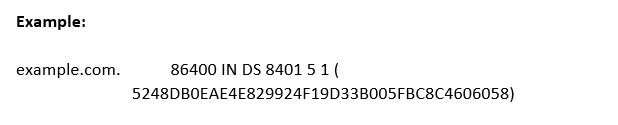
- Delegation signer (DS) record to allow the transfer of trust from the parent zone to the child zone.
- The zone operator hashes the public KSK and gives it to the parent zone to publish the hash as a DS record.
- Whenever the resolver connects with the child zone, the parent zone also shares its DS record, it makes the trust between parent and child.
- The DS record in the parent zone helps the resolver to know that the child zone is DNSSEC enabled.
- DS records should not be added in the child zone.
Why do we use two keys?
So, now the quest is what is the purpose of using two keys when both keys are from the zone itself.
We used two keys to protect the zone itself and to provide the parent-child trust, as making any modification in key signing key (KSK) is a difficult process because we have to make a hash and change that hash into the parent delegation signer (DS) record. Changing the DS record is a multi-step process that can end up breaking the zone if it’s performed incorrectly. On the other side, changing the zone signing key (ZSK) is much easier. We just need a modification within a zone.
What if the attacker compromised the child and parent server then all the DS information would match. So, to trust the DS record first understand the “The chain of trust�.
The Chain of Trust
- The chain of trust work by signing the delegate signer (DS) records by ZSK like any other RRset for the child’s keys, which means it stores the signing data into the RRSIG in the parent.
- The digital signature for DS stored in the RRSIG record.
- For the chain of trust, in example.com the validating resolver asks .com for the ZSK public key, DS and signature to verify the hash in the parent zone of the child KSK key and to verifying the KSK of .com, resolver asks the root (.) for the DS, ZSK and signatures and same process for root. The whole validation process repeats until we get to the parent’s public KSK.
Till now, example.com and .com check out, but what about root? There is no parent DS record to validate against.
For completing the chain of trust cycle, we must trust the security procedure done by a human.
For signing the root, the Root Signing Ceremony is performed every quarter in verify the public and highly audited way. In this ceremony, some selected individuals from the international community agree and sign the root DNS zone’s RRset for the DNSKEY records. The ceremony produces an RRSIG record that can be used to verify the root name servers public KSK and ZSK. Instead of trusting the public KSK because of the parent’s DS record, DNS resolver assumes that it’s valid because we trust the security process in which the Root Signing Ceremony was performed.
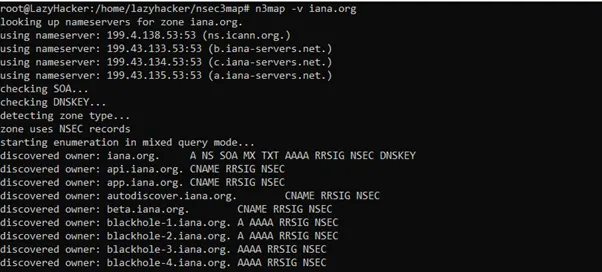
NSEC/NSEC3 (Explicit Denial of Existence)
In traditional DNS setup, when we ask DNS for the IP address of a domain that doesn’t exist, it returns an empty answer. So, how we authenticate that domain doesn’t exist since there is no message to sign. The fix for this issue was to add NSEC and NSEC3 record types that explicitly tell a DNS resolver that a given zone does not exist.
The NSEC record is used to prove that something really does not exist, by providing the name before it, and the name after it.
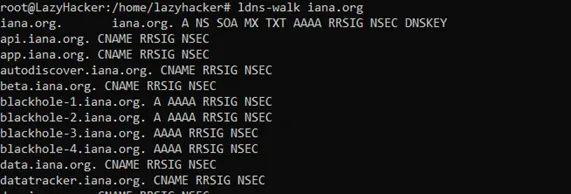
NSEC works by returning the “next secure� record. The NSEC record allows for proof of non-existence for record types. For every existing name, there is a corresponding NSEC record. This NSEC record states what types are available for the current name, as well as the next valid name, is in the sorted zone file. This brings us to the downside of NSEC: Since the NSEC records essentially chain through the complete zone, it’s possible to do “zone walking�.
Example:
example.com
api.example.com
beta.example.com
Let’s assume a request is made for example.com
Request:
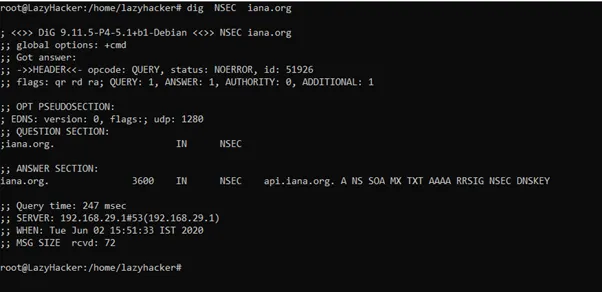
dig NSEC example.com
Response:
ANSWER SECTION:
example.com. api.example.com. A NS SOA MX TXT AAAA RRSIG NSEC DNSKEY
Request:
dig NSEC api.example.com
Response:
ANSWER SECTION:
api.example.com. beta.example.com. A NS SOA MX TXT AAAA RRSIG NSEC DNSKEY
In the same way, attackers use it for zone walking and enumerate all subdomains in the zone.
NSEC3 uses a hashing algorithm to list the next available domain in the “hashed� format. It is still possible for an attacker to do zone walking, although at a higher computation cost.
DNSSEC Process
- The user enters the example.com in the browser to access the website.
- DNS request transfer to resolver for the DNS resolution.
- Resolver query example.com nameservers for the A record and in this query, resolver add DNSSEC bit, which notifies the nameserver that resolver is DNSSEC enabled and DNSSEC Answers are desired.
- The name server is DNSSEC enabled, so nameserver responds with the answer to the A record query with the RRSIG of A record which is the digital signature for the verification purpose.
- For digital signature verification, the resolver asks the nameserver for the public key which is DNSSEC (ZSK and KSK) records.
- Nameserver responds with DNSSEC (ZSK and KSK) and RRSIG of the DNSSEC records.
- The DNSSEC(ZSK) record is used to verify the RRSIG of the A record, the answer received in step 4 and DNSSEC (KSK) record is used to verify the RRSIG of the DNSSEC (ZSK and KSK) record.
- For the chain of trust, the resolver queries the parent (.com) for the DS record that is hash of the of example.com KSK.
- Parent (.com) nameserver responds with the DS record and RRSIG of the DS record.
- The DS record is the hash value of the child KSK that stored in the parent DS record. The resolver verifies the RRSIG record of the KSK in the child by decrypting the digital signature and comparing the hash of the DS record with the hash of the RRSIG KSK after decryption.
- Resolver query the .com nameserver for the DNSKEY to verify the RRSIG of the DS record.
- The parent (.com) nameserver responds with the DNSKEY (ZSK and KSK). The resolver decrypts the RRSIG of the DS record with the ZSK public key and verifies the result. RRSIG of KSK verifies by the KSK public key.
- For the chain of trust, the resolver asks the root (.) for the (.com) DS record, which is a hash of the .com KSK.
- The root name server responds with DS record and RRSIG of DS. The DS record is used to verify the KSK of the (.com).
- Resolver query for the DNSKEY of the root to verify the RRSIG record of DS.
- The root nameserver responds with the DNSKEY, resolver decrypts the RRSIG of the DS with the root ZSK, and compare the DS values. Public root KSK is used to decrypt the RRSIG of the ZSK and compare the ZSK for the trust. If all the results are verified, then all zones and records are trustable.
🛠Tools for NSEC subdomain enumeration
- ldns-walk
- nsec3map
- dig
Subdomain Enumeration by DNS Records
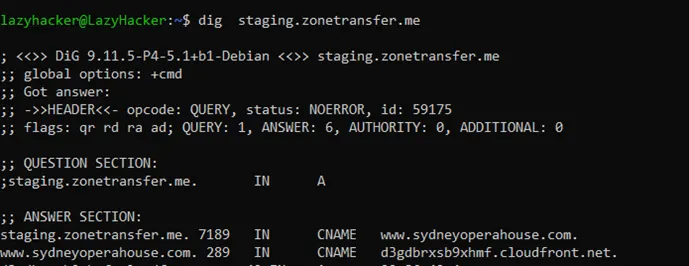
What are CNAME Record in DNS
In DNS zone file CNAME stands for a canonical name. CNAME is used in the domain name system (DNS) to create an alias or pointer for one domain name to another domain name.
For example:
example.com A 192.168.1.1documents.example.com CNAME example.com
Let say, example.com is the domain name that connects with the file server, where you store all the personal files, but you want to access the same server with documents.example.com for better understanding. So, for accessing the domain with documents.example.com you have to create an alias or pointer that points to the example.com.
Sometimes CNAME reveals an organization subdomain or reveals information about third-party services like Amazon.
What is SPF Record in DNS
SPF is the Sender Policy Framework as the name suggests. It is a policy that is used for whitelisting the IP address and domain names which are authorized to send an email on behalf of your domain. SPF is the list of IP addresses and domains that are allowed to send an email on behalf of your domain.
So, when you send an email let say from the example.com domain to the gmail.com domain. The Gmail that receives the email will check if the IP address of the mail server that sent the email is included in the SPF record of the example.com zone file.
If the sending IP address is in the list, the email will pass the SPF check and mail will likely be delivered.
If the sending IP is not on the SPF record, it likely not to be delivered.
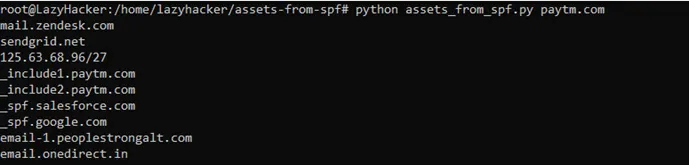
An adversary uses this information to understand the organization’s infrastructure, IP addresses, third-party email services, internal netblocks, and subdomains. The SPF record is defined using the TXT record. So, whenever one searches for the SPF record, it should be searched by the TXT record.

🛠Tool for information gathering
Netblocks, ASN, and Domain names extractor from SPF Record
https://github.com/0xbharath/assets-from-spf
Subdomain Enumeration by HTTP Header
Content Security Policy (CSP) is a response header that tells the browser from what sources it is allowed to include and execute resources from.
It is like a filter where sources are mentioned and in sources, the domains and subdomains are mentioned. An adversary may use this information to enumerate more subdomains and other domains that are allowed by the organization.
🛠Tools For Subdomain enumeration by HTTP header
- Curl
- Domain extraction from CSP
https://github.com/0xbharath/domains-from-csp
Convert Domain to IP Address
🛠Tools :
https://gist.github.com/xdavidhu/07457247b9087dea4ddaf52858500cce
#!/bin/bash
# Converter.sh by @xdavidhu
# This is a script inspired by the Bug Hunter's Methodology 3 by @Jhaddix
# With this script, you can convert domain lists to resolved IP lists without duplicates.
# Usage: ./converter.sh [domain-list-file] [output-file]
echo -e "[+] Converter.sh by @xdavidhu\n"
if [ -z "$1" ] || [ -z "$2" ]; then
  echo "[!] Usage: ./converter.sh [domain-list-file] [output-file]"
  exit 1
fi
echo "[+] Resolving domains to IPs..."
while read d || [[ -n $d ]]; do
  ip=$(dig +short $d|grep -oE "\b([0-9]{1,3}\.){3}[0-9]{1,3}\b"|head -1)
  if [ -n "$ip" ]; then
    echo "[+] '$d' => $ip"
    echo $ip >> $2
  else
    echo "[!] '$d' => [RESOLVE ERROR]"
  fi
done < $1
echo -e "\n[+] Removing duplicates..."
sort $2 | uniq > $2.new
mv $2.new $2
echo -e "\n[+] Done, IPs saved to '$2'."
Passive sub-domain enumeration techniques
By Certificate Transparency
Before understanding the certificate transparency, we would first need to understand the basic terminology related to digital certificates.
What is a digital certificate?
A digital certificate is a certificate that is issued by the trusted third party which is called a certificate authority to verify the identity of the certificate sender or holder.
For example: The driving license assigned by the government authority which is a third party whom we trust. The traffic police check if the ride can or cannot ride by checking the driving license. Here in this example traffic police are like users who access the website and government authority is the certificate authority whereas the rider is the website.
Who are certificate authorities?
Certificate authorities or CA are the globally trusted third-party companies like VeriSign, GeoTrust, GoDaddy, etc that manage three major tasks:
- Issues certificates
- Confirm the identity of the certificate owner
- Provide proof that the certificate is valid
What is a digital signature?
A digital signature is a mathematical way for verifying the authenticity of digital messages or documents.
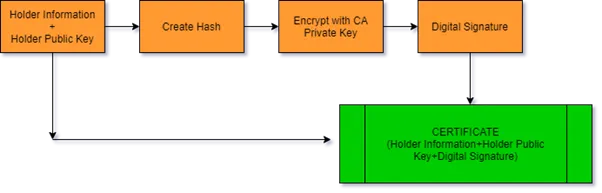
The steps followed in creating a digital signature are:
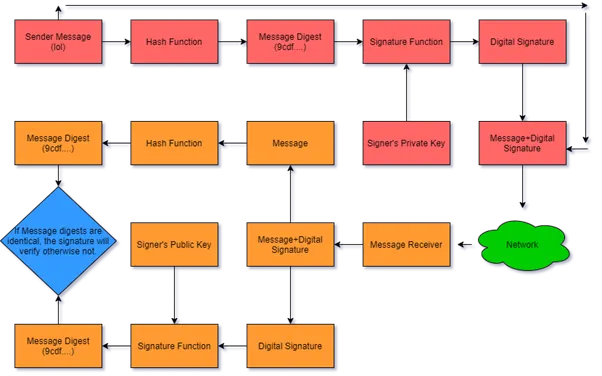
- The website holder generates the “public key� and “private key�.
- The website holder sends the “public key� with some other information like holder name, subject, serial number, signature algorithm, signature, etc to the certificate authority.
- The certificate authority verifies the data provided by the Website holder then builds the certificate and finally digitally signs it for the holder. A certificate is a document that contains necessary information about the website holder like the holder public key, expiration date, name of the certificate holder, the digital signature of the certificate-issuing authority.
- CA send the certificate to the website holder. The holder configures the certificate in the server.
How the Digital or SSL Certificate works when a user accesses a website?
- When we access the https website in the browser, let say Google, google server sends the server public key and the certificate which was signed by CA to the user.
- Now the user browser verifies the authenticity of the certificate. As all the browsers come with pre-installed globally trusted CA public keys. The browser tries to decrypt the certificate that was digitally signed by the CA public key.
- If the browser is able to decrypt the signature (which means, it is a trustworthy website) then it proceeds to the next step else it stops and shows a red cross before the URL.
- As told in the above steps, Google sends its public key when we enter https://www.google.com in the browser. Any data encrypted with this public key can only be decrypted by Google’s private key which Google does not share with anyone.
- After certificate validation, the browser creates a new symmetric key let us say “Session Key� and make 2 copies of it. These keys can encrypt as well as decrypt the data.
- The browser then encrypts one copy of the session key and other request data with Google’s public key and sends it back to the Google server.
- Then Google’s server decrypts the encrypted data using its private key and gets the “Session Key�, and other requested data.
- When Google sends the HTTP data to the browser, it first encrypts the data with the “Session Key� and the browser decrypts the data with the other copy of the session key because this key is a symmetric key.
- Similarly, when the browser sends the HTTP data to the Google server it encrypts it with the “Session Key� which the server decrypts on the other side.
What is Certificate Transparency?
Certificate Transparency is the open-source framework for the certificate authorities (CAs) under which they log the certificates to the domain name owners. In this way, anyone can see which CA has issued a certificate for which domains. It is like the inventory of all certificates, certificate authorities, and domains.
Why we need Certificate Transparency?
- By compromising the infrastructure of the certificate authority, the adversary can maliciously issue the certificates by the certificate authority without the consent of CA.
- The certificate authority can mistakenly issue a certificate to the wrong owner.
The problem with the previous CAs infrastructure was that there was no effective way to audit or monitor SSL certificates in real-time. So, when any missteps or malicious activities happen, the suspect certificate was not usually detected and revoked for weeks or months. These miss issues of certificates were used to spoof a legitimate website or to install malicious software etc.
Case Study: The DigiNotar was a Dutch certificate authority that was compromised, and the adversary used the CAs system to issue 500 fake SSL certificates. In the investigation, it was discovered that the adversary issued the wildcard certificate for google.com. Which gave the adversary the ability to impersonate Google. This was widely used by the adversary to attack against Gmail users in Iran.
How does Certificate Transparency help in OSINT?
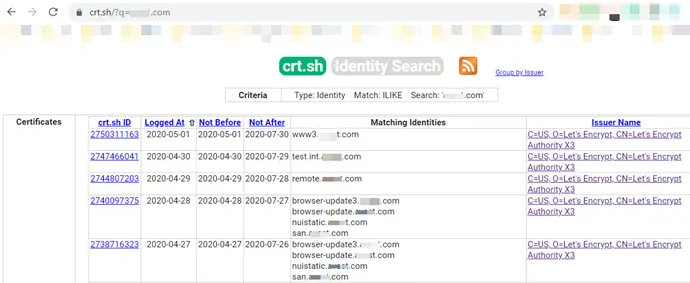
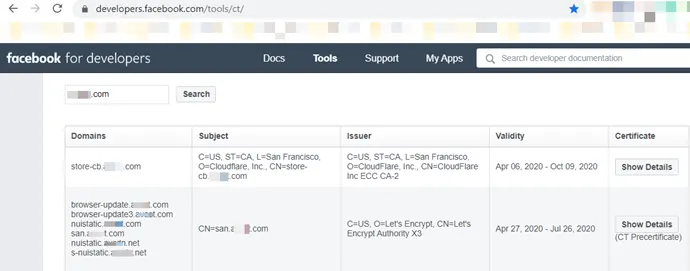
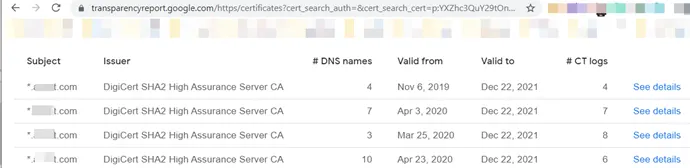
Now we know that certificate transparency logs all the entries of the issued certificates in an inventory. This includes domain names, sub-domain names, and email addresses. This is publicly available to everyone. By using CT (Certificate Transparency) logs an adversary can gather basic information about the organization’s infrastructure in a passive way.
CT logs search engines:
- https://crt.sh/
- https://censys.io/
- https://developers.facebook.com/tools/ct/
- https://google.com/transparencyreport/https/ct/
- https://sslmate.com/certspotter/
Note: It may be possible that the domain/sub-domain during recon may not resolve because the domain/sub-domain names may not exist. Certificate Transparency logs are only appended and there is no way to delete these domains from CT logs.
Subdomain enumeration using Search Engines:
Search engines are one of the best techniques to find subdomains in a passive way. During my research, I found that the “Site:� operator which was used to search domain and subdomains was working in the below-mentioned search engines:
Example: site:example.com
Subdomain enumeration using Online DNS Tools:
During my research I found 9 sub-domain enumeration services:
- https://decoder.link/
- https://searchdns.netcraft.com/
- https://dnsdumpster.com/
- https://www.virustotal.com/gui/home/search
- https://pentest-tools.com/information-gathering/find-subdomains-of-domain#
- https://findsubdomains.com/
- https://hackertarget.com/find-dns-host-records/
- https://www.pkey.in/tools-i/search-subdomains
- https://spyse.com/
Comparison of online available subdomains enumeration services:
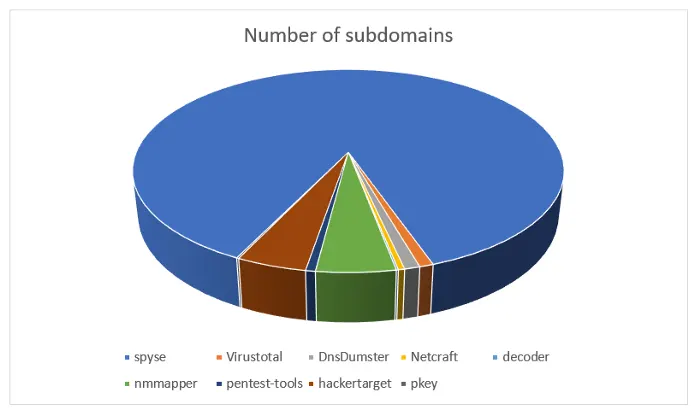
The subdomains number mentioned in pie-chart were not validated, so it may be possible that these subdomains are false positive, but you can validate by using “massdns� or any other tool that resolves subdomains.
Subdomain enumeration using ASN (Autonomous System Number) number
An autonomous system is a set of interconnected networks under single administrative control. In simple term, ISP (Internet Service Provider) is an autonomous system where one or more intradomain routing protocols are used to handle the networking inside the autonomous system and only one inter-domain routing protocol which is BGP (Border Gateway Protocol) is used to handle the routing between different autonomous systems.
What is Autonomous System Number (ASN)
An autonomous system number is a unique number that is given to an Autonomous system and which is assigned by IANA (Internet Assigned Numbers Authority). Autonomous system numbers can be public or private.
Private ASN: A private ASN is a unique identifier for an AS that is used for communicating an AS to one entity.
Public ASN: A public ASN is a unique identifier that is advertised to the public internet. This is also used to communicate between ASNs.
Every ISP buys the IP address pool and ASN number from IANA. The IP address pool and ANS number are unique. It helps to differentiate the network from other networks. For BGP connection with multiple networks, ASN is needed and for an internal autonomous system (AS) IP address is needed. BGP protocol works on the ASN number.
In the above image, when BOB sends a message to Marley from Reliance Jio ISP to BSNL ISP below are the steps that are performed for sending messages.
- When BOB sends a message to Marley, it is first delivered to Reliance Jio ISP using intradomain routing.
- Reliance Jio ISP checks the destination IP address and then search for ASN number where the source IP address exists, here in this case Reliance Jio finds the BSNL ASN number.
- The BGP protocol is used for message delivery between both autonomous systems.
- BSNL ISP received the message and then the message is delivered to Marley.
Note: Many large network infrastructure organizations also have the ASN numbers, so it’s not necessary that only ISP has the ASN number. It usually depends on the network infrastructure in use.
How is ASN number used in subdomain enumeration?
- Initially, find ASN number by IP address or domain name. ASN number will help you to get the IP address pool.
- Resolve the IP address to the domain using dig, host, or any other tools. Note that the IP address to the domain only resolves when the PTR record is configured in DNS configuration.
Online 🛠Tools to find ASN number
- http://ip-api.com/json/[IP Address/Domain name]
- https://www.radb.net/query?
- https://bgp.he.net/
- https://mxtoolbox.com/asn.aspx
- https://hackertarget.com/as-ip-lookup/
- http://whois.domaintools.com/
- https://who.is/
- https://asn.cymru.com/cgi-bin/whois.cgi
Online 🛠Tools to find IP pool from ASN number
We can use WHOIS queries and Nmap script to find all the IP addresses that belong to the ASN
Example:
whois -h whois.radb.net -- '-i origin AS36459' | grep -Eo "([0-9.]+){4}/[0-9]+" | uniqnmap --script targets-asn --script-args targets-asn.asn=17012
Subdomain enumeration using Subject Alternate Name (SAN)
What is Subject Alternate Name (SAN)
It is an extension to the X.509 specification that allows us to secure additional domains or subdomains by a single SSL certificate. It is also called a “multi-domain SSL certificate�.
So, now the question is what is the difference between a multi-domain SSL certificate and a wildcard SSL certificate?
Wildcard Certificate
Wildcard certificate only secures the multiple subdomains under the main domain.
Example: If issued a wildcard certificate on *.example.com then this certificate secures only subdomains which ends with “example.com�.
- www.example.com
- test.example.com
- ftp.example.com
Multi-Domain SSL Certificate
The multi-domain SSL certificate secures up to 250 unique domain names or subdomains and that domain/subdomains names mentioned in the Subject Alternative Names (SAN) field in the certificate.
Example: If issued a multi-domain SSL certificate on “example.com� then we can add multiple other domains and subdomains in SAN to protect them by SSL.
- example.com
- test.com
- ftp.example.com
🛠Tools to extract domain names from SAN
OpenSSL
true | openssl s_client -connect wikimedia.org:443 2>/dev/null \
| openssl x509 -noout -text \
| perl -l -0777 -ne '@names=/\bDNS:([^\s,]+)/g; print join("\n", sort @names);'
By Python Script
https://github.com/appsecco/the-art-of-subdomain-enumeration/blob/master/san_subdomain_enum.py
Command: python san_subdomain_enum.py wikimedia.orgSubdomain enumeration using Public Dataset (Rapid7)
Project Sonar is an initiative by Rapid7. Rapid7 initiates the project Sonar, where Rapid7 performs Internet scanning to collect Internet-wide scan data and then publish the results publicly for free and some data is paid. Datasets cover areas like:
- Forward DNS
- Reverse DNS
- HTTP Responses
- SSL Certificates
- Port Scans
These datasets can be useful during an offensive engagement like in this case for subdomain enumeration. Although finding data in large datasets is very time-consuming.
Rapid7 Datasets Link: https://opendata.rapid7.com/
Subdomain enumeration using Cloudflare
Cloudflare is the network of servers that are spread all over the world to create CDN (Content delivery network) like technology. This network act as a reverse proxy server between users and the server that holds the website.
Difference between reverse proxy and forward proxy
What is Reverse Proxy
- The reverse proxy is a server-side concept and acting on behalf of the server/service/content producer.
- A reverse proxy is a server that is in front of the webserver/service and when client requests for websites/services, the request is initially delivered to the reverse proxy, and then the reverse proxy communicates to the webserver/service on behalf of the server.
- The reverse proxy is implemented to increase performance and security.
- The reverse proxy is used for load balancing, SSL multiplexing, caching, application firewall, authentication, etc.
What is Forward Proxy
- A forward proxy is a client-side concept and acting on behalf of the requestor or service consumer.
- A forward proxy is a server that is in front of client machines and when client requests for websites/services, the request is first delivered to the forward proxy, and then the forward proxy communicates to the webserver/service on behalf of the client.
- A forward proxy is used for content filtering, Email security, Nating, etc.
What is Content Delivery Network (CDN):
It is a network of distributed caching servers with a web application firewall, which are used for delivering the content in the most optimal way and improve end user’s performance.
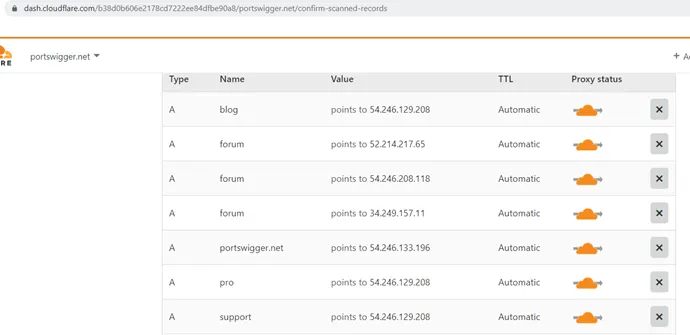
Steps for subdomain enumeration by Cloudflare:
- Login to Cloudflare https://www.cloudflare.com/login
- Click on “Add site� to your account https://www.cloudflare.com/a/add-site
- Provide the target domain as a site you want to add.
- Wait for Cloudflare to dig through DNS data and display the results.
Thank You � For Reading This Amazing Article On 👉 : Active & Passive Subdomain Enumeration
I’ve opened My Bug Bounty tips Group You Will Get :
âž¡ Best Tips for Bug Bounty
âž¡ Good And Informative Articles From Infosec Community
âž¡ One-liners Command
âž¡ Infosec Resources
âž¡ ebooks – Paid ?
âž¡ And Many More
It is awesome
Thanks You 😀